ListingAI Review: Staging, Video, CMA & Credit Costs
Restages furnished rooms, builds 2.5D listing videos, and drafts listing copy and CMA reports from one dashboard.
Last updated: September 17, 2026
Disclosure: Some links below are affiliate links. At no additional cost to you, we may earn a commission if you purchase.
The Verdict & Ratings
ListingAI is far more than a photo editor; it is a comprehensive real estate marketing suite that automates virtual renovation, 2.5D video slideshows, and CMA reports. A recent Beta release targets cross-angle consistency, but the two-stage billing system still charges for AI hallucinations, making it an expensive tool for trial and error.
Overall Score
4.2
/ 5.0
Ease of Use
All tools live in one dashboard; it generates videos and descriptions with zero editing skills required.
Value
The $36/month plan offers 300 image credits, but the official FAQ prices one accepted 2K image at 6 credits (2 to generate, 4 to accept), and a rejected draft refunds nothing.
Quality
Impressive item replacement inside a furnished room. Cross-angle consistency is the weak spot: the founder's own walkthrough demonstrates a perspective-drift bug that reshapes windows and door frames, and he confirms it is a known issue.
Adaptability
Covers virtual staging, auto-written listing descriptions, 2.5D listing videos, and comparative market analysis.
✅ Best for
Solo agents and transaction coordinators who want a single hub to instantly turn listing photos into branded websites, social videos, and CMA reports.
❌ Not for
Detail-oriented videographers expecting true 3D spatial fly-throughs, or budget-conscious agents who need unlimited free rerolls to fix AI mistakes.
Quick Decision Table
| Feature | Details & Hands-on Metrics |
|---|---|
| Tool | ListingAI (listingai.co) |
| Best for | Replacing old furniture in furnished rooms, automated listing descriptions, 2.5D social videos, and US CMA reports. |
| Price | $19/month (Essential: basic previews, no multi-angle); $36/month (Professional: 300 image credits plus full features). Staging deducts credits in two stages: Generate, then Accept. |
| Free Tier | Free plan: 9 image credits + 3 scene credits for Cinematic AI Motion. Standard Motion video previews are unlimited on every plan. |
| Verdict | An incredibly versatile marketing ecosystem, but beware of the hidden credit costs if you rely on trial and error to fix AI glitches. |
Core Features: What We Tested vs. What the Vendor Shows
Hands-on Test 1: Virtual Renovation
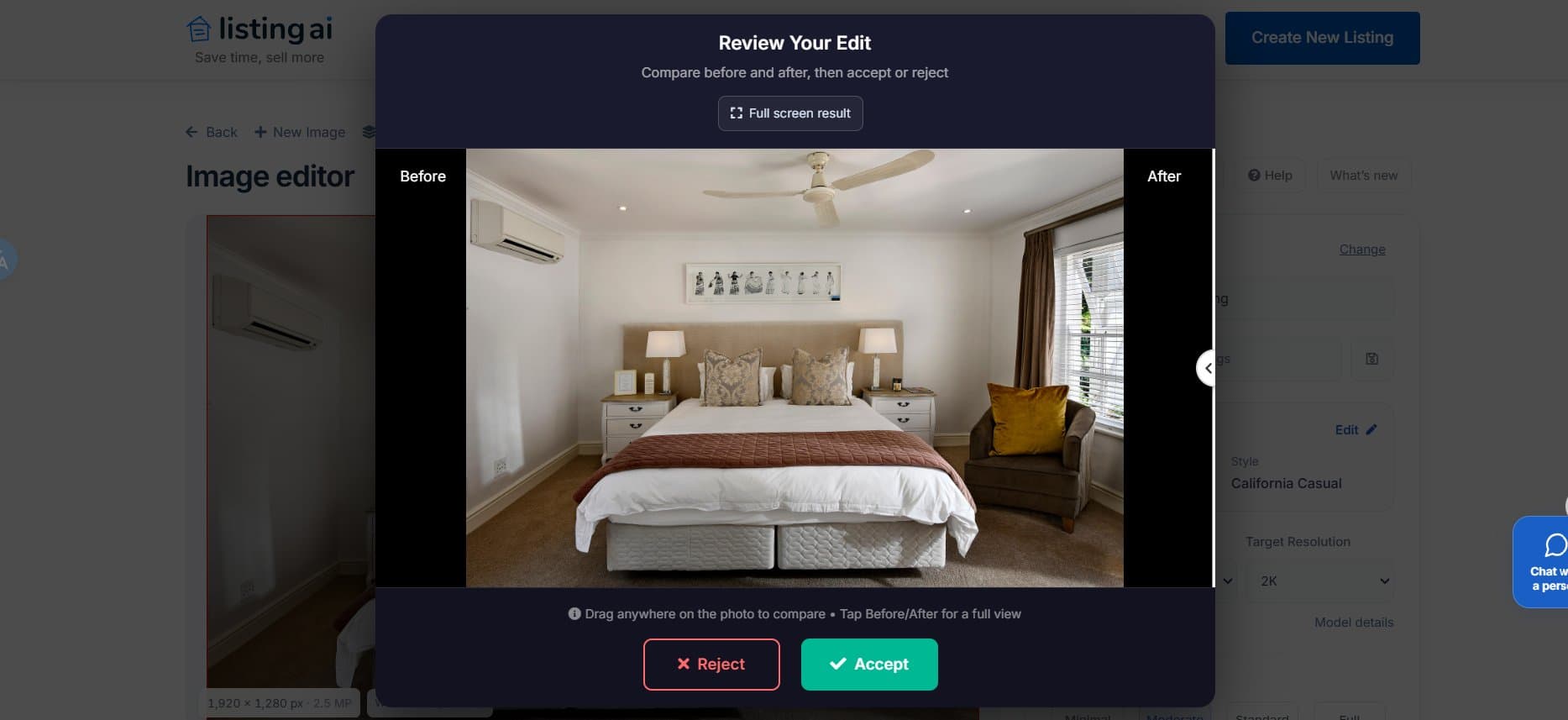
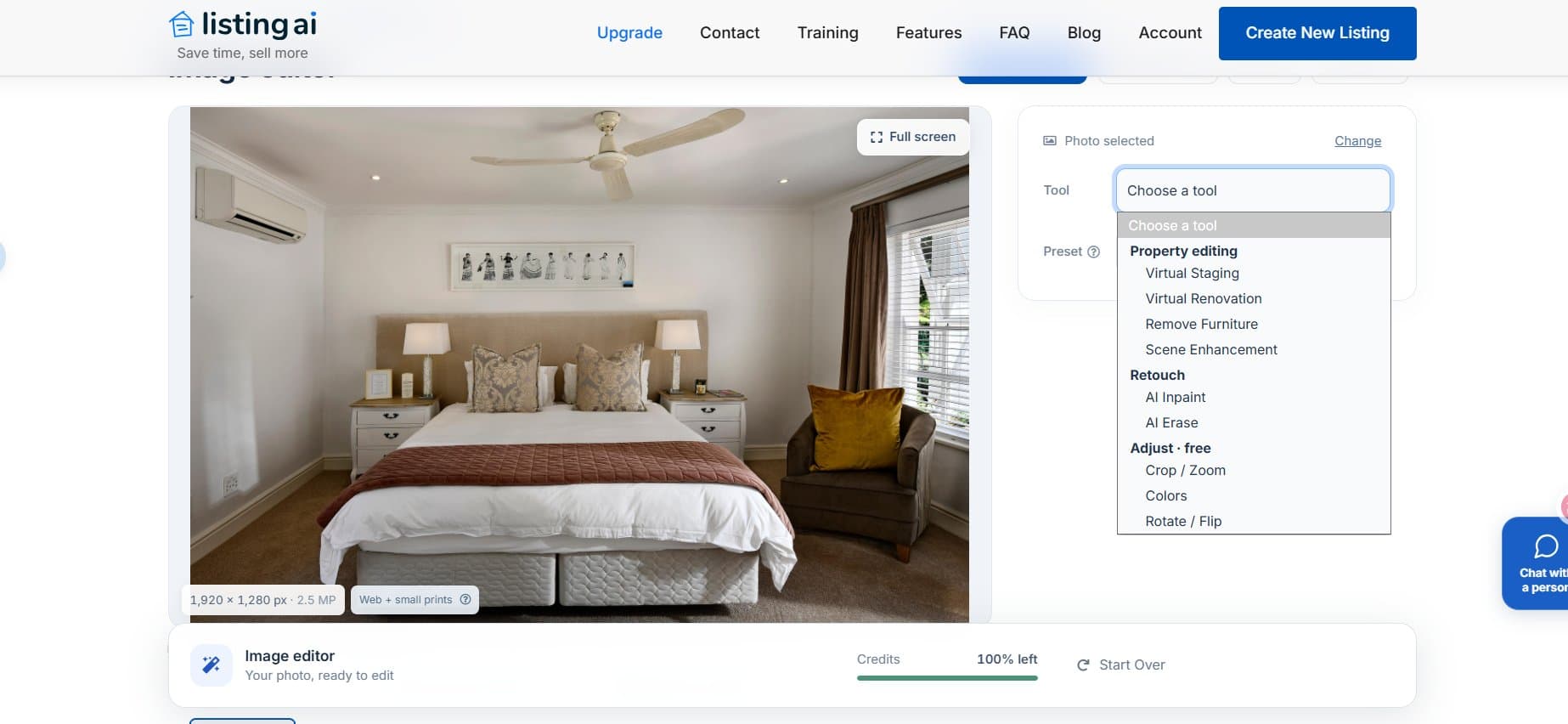
I tested the renovation tool on a fully furnished bedroom. ListingAI erased the old bed and chair and injected modern decor while preserving permanent fixtures such as the ceiling fan. The vendor also lists a Multi-angle Staging Beta: once you approve a design in one photo, the AI carries that furniture layout across the other photos of the same room. Cross-angle consistency is exactly where earlier versions fell over, as the founder demonstrates in his own walkthrough when furniture and props change between shots of the same room, so treat the Beta as unproven until you run it on a full photo set.

Vendor Walkthrough: Photo-to-Video Generation & Branding
In the founder's recorded walkthrough, the video creator turns static listing photos into a branded slide-show video: 2.5D pan and zoom, background music, captions and a brokerage end card, produced in 1-2 minutes. Standard Motion rendition is unlimited on every plan, while Cinematic AI Motion uses 1 Cinematic Scene Credit per scene. That walkthrough also demos 1080p at 1 credit and 4K at 2 credits, which the current FAQ no longer spells out, so confirm the rate in-app before exporting a full listing set.
Vendor Walkthrough: US-Only CMA Reports & Compliance Auto-Correct
We assessed the CMA (Comparative Market Analysis) generator and the compliance rules against the vendor's own walkthroughs rather than our own listings. CMA reports are built from public and county records, not an MLS feed, and they cover United States properties only. In the CMA walkthrough the founder warns that county data quality varies by region, so unpermitted changes can leave the recorded bathroom count or square footage out of step with the property, and the default set of 25 comparable sales usually needs manual pruning before the pricing narrative is regenerated. The branding walkthrough separately shows custom dictionary rules that rewrite outdated terms such as Master Bedroom to Primary Bedroom or Owner Suite, plus controls that lock MLS compliance fields such as license numbers and brokerage logos.
Head-to-Head Comparison
| Feature | ListingAI (Tested) | Virtual Staging AI | Apply Design |
|---|---|---|---|
| Core Ecosystem | Staging + videos + CMAs + branding | Pure staging and object removal | Hardcore 3D staging and 360-degree tours |
| Video Generation | Yes (2.5D pan and zoom from photos) | No | Yes (via 4-second clip exports) |
| Reroll Penalty | High: rejected drafts still burn credits | Zero (unlimited renders per unlocked photo) | Zero (unlimited revisions for paid accounts) |
| Furnished Rooms | Excellent: replaces existing furniture seamlessly | Struggles: aggressively erases built-ins | Requires manual model dropping |
Pain Point Solutions
How to Renovate Outdated Furnished Listings Digitally
Pain Point & Traditional Cost
Selling a home packed with a tenant's ugly, outdated furniture kills buyer interest. Physically emptying the room and restaging costs thousands, and manual replacement in an image editor takes hours per photo.
AI Solution
ListingAI's Virtual Renovation mode bypasses the need for an empty room. It identifies existing beds, sofas and tables and replaces them with modern decor styles such as California Casual, while keeping the original architectural shell intact.
How to Make Real Estate Videos Without Editing Skills
Pain Point & Traditional Cost
Hiring a videographer to shoot a property walkthrough is a paid line item, and editing static photos into a dynamic slideshow in Premiere Pro takes real technical skill.
AI Solution
Upload existing listing photos and the system applies 2.5D perspective movement, aligns the shots to a beat, and attaches your brokerage branding in under 2 minutes, ready for social media.
❌ The Dealbreaker
The Two-Stage Billing Trap & Costly Hallucinations
ListingAI uses a two-stage credit deduction that its own documentation confirms. Simply clicking Generate to create a preview costs credits. If you like the result and click Accept, it charges additional credits. If the AI hallucinates and you click Reject, the initial generation charge is permanently lost.
And the AI does hallucinate
In the vendor's own walkthrough the founder demonstrates a perspective-drift bug that reshapes the windows and door frames of a staged room and confirms it is a known issue (16:47), then shows a bedroom that fails the platform's built-in quality check outright (22:11). Both moments are linked with timestamps under Sources below. Because a perfectly matched room often takes several discarded drafts, and a rejected draft keeps its generation charge, one usable photo can eat a large share of a small allowance.
Frequently Asked Questions
Does ListingAI create actual 3D fly-through videos?
No. The Photo-to-Video feature uses 2.5D motion (Ken Burns effects such as panning and zooming) on static photos. It cannot turn corners or create true 3D spatial walkthroughs.
What happens if I don't like the staged image it generates? Do I get my credit back?
No. Generating a draft costs credits. Rejecting a draft because of poor quality or AI hallucinations does not refund that initial charge, and the official FAQ states the generation charge remains. You only pay the remaining additional credits if you click Accept.
Can I generate a Comparative Market Analysis (CMA) for properties outside the US?
No. The vendor's own CMA walkthrough states that the tool works as long as the listing is in the United States. Reports are built from public and county records rather than an MLS feed, and ListingAI's own FAQ says the company does not offer IDX or MLS integrations at this time.
How We Tested
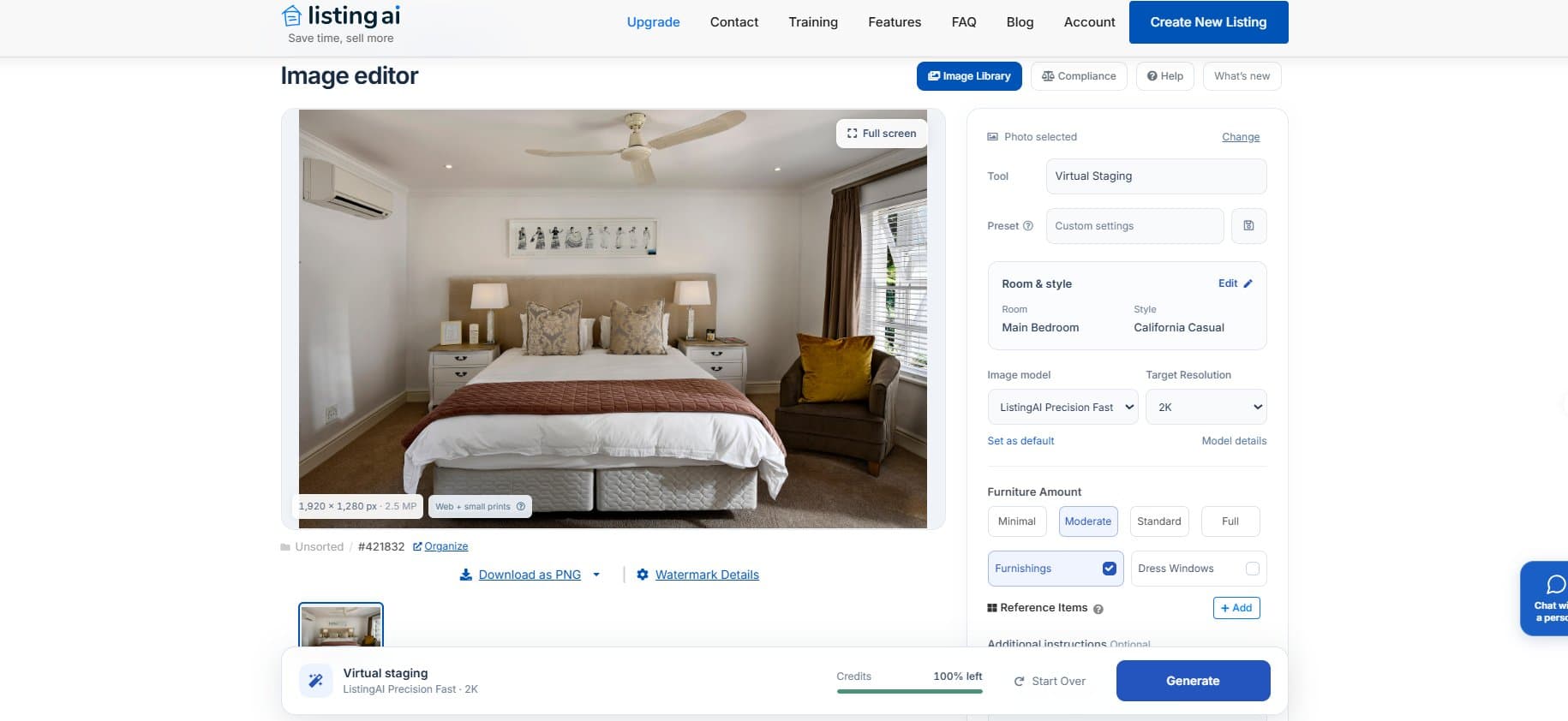
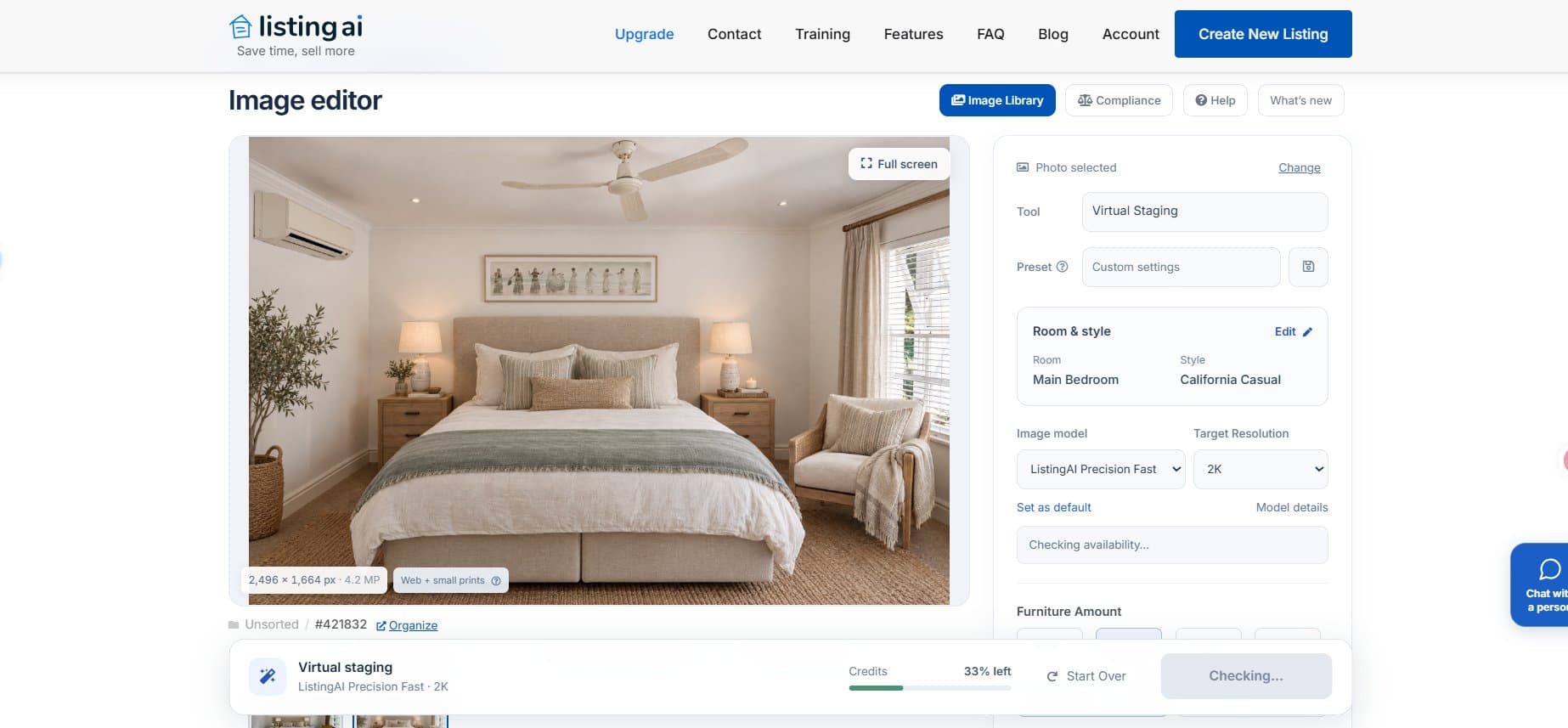
We evaluated ListingAI's dashboard in 2026 using an active account. Our main focus was the Virtual Renovation tool. We uploaded a furnished main bedroom with an outdated bed and armchair, then selected the California Casual preset with a Moderate furniture amount.
After clicking generate, the AI swapped the old furniture for modern pieces while preserving permanent fixtures such as the ceiling fan and the wall-mounted AC unit. We tracked the billing meter closely: before generating, the balance read Credits 100% left, and immediately after we clicked Accept on the final edit it fell to Credits 33% left. That matches the vendor's own example, which prices one accepted 2K image at 6 credits (2 to generate, 4 to accept): on the free plan's 9 image credits, one accepted image leaves exactly a third behind.
Scope note: the screenshots in this review document the renovation run and the credit meter, which is what we tested ourselves. The video, staging, CMA and compliance sections describe what the vendor's own recorded walkthroughs and published documentation show rather than our own listings: video (youtube.com/watch?v=czm-nbODcJw), staging (youtube.com/watch?v=E2Lcvpnf0ak), CMA (youtube.com/watch?v=Jj_Zr9ME3Ag) and branding and compliance (youtube.com/watch?v=Tbr2EvE1_xA).
Sources for this review
- How do image credits work? - ListingAI FAQ (official) — the 2 credits to generate + 4 to accept example, and the no-refund rule for rejected drafts
- How do Cinematic Scene Credits work? - ListingAI FAQ (official) — Standard Motion unlimited on every plan, Cinematic AI Motion at 1 Cinematic Scene Credit per scene
- How to Use Virtual Staging & Virtual Twilight - Listing AI (official channel) — the window and door-frame drift bug the founder demonstrates and confirms as a known issue, from 16:47
- How to Create Professional Property Videos with AI in Minutes - Listing AI (official channel) — the walkthrough's "Full AI" motion mode, now sold as Cinematic AI Motion, charged at 1 credit for 1080p and 2 for 4K, from 05:27
- How to Use Virtual Staging & Virtual Twilight (failed quality check) - Listing AI (official channel) — the staged bedroom that fails the platform's built-in quality check, from 22:11
- How to Create a Comparative Market Analysis (CMA) with AI - Listing AI (official channel) — the US-only limitation of CMA reports, from 11:58
- How to Setup Your Branding in ListingAI - Listing AI (official channel) — MLS compliance fields and the custom dictionary rules that rewrite Master Bedroom as Primary Bedroom, from 19:14
Try ListingAI
Free plan: 9 image credits + 3 scene credits for Cinematic AI Motion; Standard Motion video previews are unlimited on every plan